Cell Stack

← 返回·

Memo Code 系统提示词架构解析:从模板到上下文组装

深入解析 Memo Code 如何组装系统提示词,包括基础模板、用户偏好、项目配置、工具描述等各层级的构成逻辑,以及 XML 格式的系统提示在异常处理中的应用。
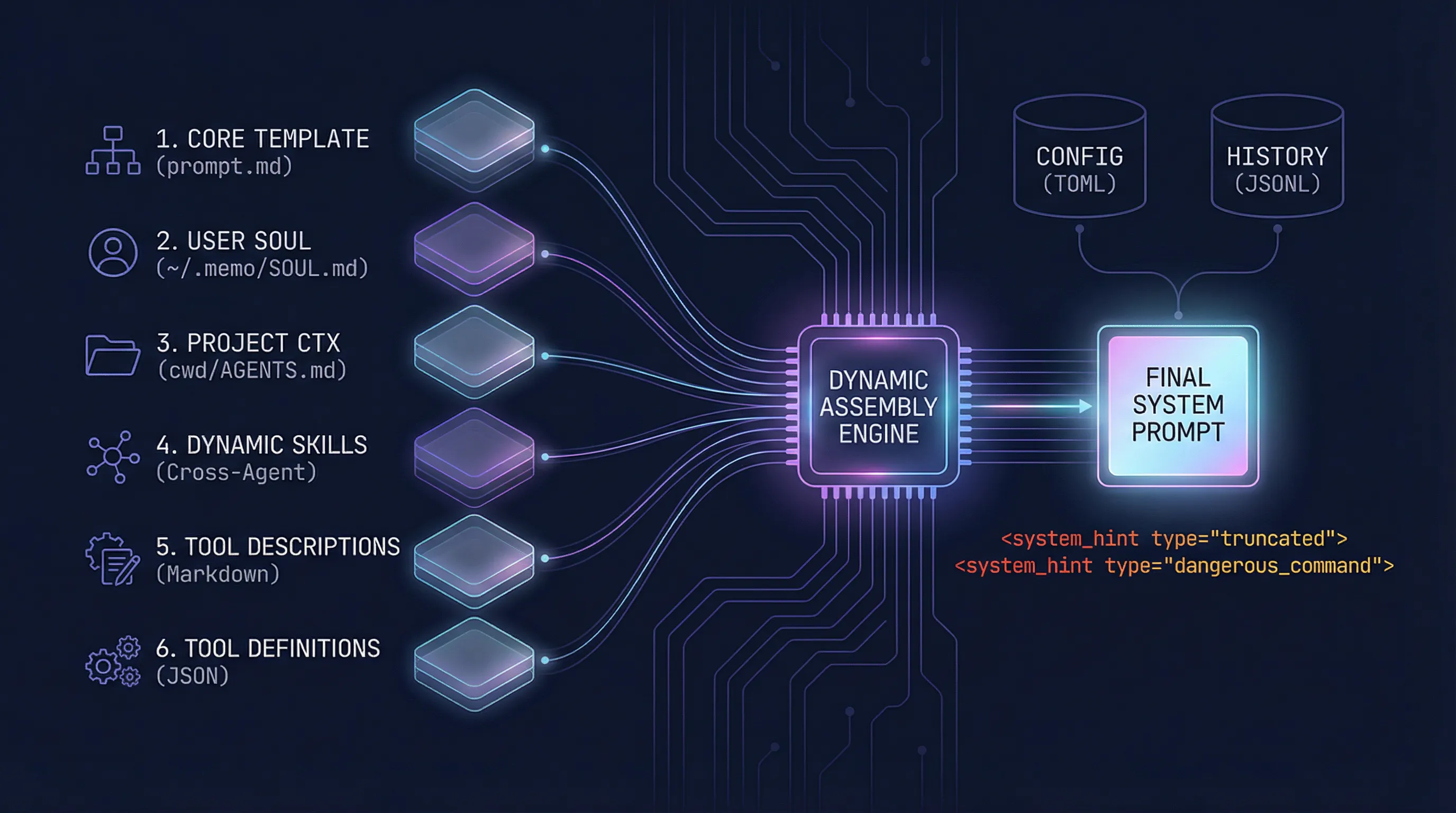
做 Agent 开发时,系统提示词(System Prompt)是影响模型行为的第一优先级。一个好的提示词架构不仅要清晰可维护,还要能动态适配不同场景。这篇来聊聊 Memo Code 的提示词组装方案。

提示词不是静态文档,而是动态拼装

很多人把系统提示词当作一个固定的 Markdown 文件来管理,但在实际项目中,提示词需要承载:

  • 基础行为指令(核心身份、输出规范)
  • 用户偏好设置(SOUL.md)
  • 项目级上下文(AGENTS.md)
  • 动态工具能力(内置工具 + MCP 工具)
  • 运行时异常状态(截断、危险命令拦截)

这些信息来源不同、格式不同、优先级不同,需要一套统一的拼装逻辑。

层级拆解:提示词的六层结构

Memo Code 的系统提示词按顺序包含以下六个层级:

顺序内容格式来源
1基础模板Markdownprompt.md
2用户个性偏好Markdown~/.memo/SOUL.md
3项目上下文Markdowncwd/AGENTS.md
4技能说明Markdown动态加载
5工具描述Markdownrouter.generateToolDescriptions()
6工具定义JSONAPI 调用时传入

第一层:基础模板(Core Prompt)

基础模板定义了 Agent 的核心身份和行为规范。这是一个 Markdown 文件,位于 packages/core/src/runtime/prompt.md,包含了:

  • Core Identity:Local First、Project Aware、Tool Rich、Safety Conscious
  • Tone and Style:输出简洁性要求(< 4 行)、示例展示
  • Tool Usage Policy:并行调用原则、工具选择优先级
  • Task Management:update_plan 的使用规范
  • Doing Tasks:理解 → 规划 → 搜索 → 实现 → 验证的流程
  • Git Operations:提交和 PR 的操作规范
markdown
# Core Identity- **Local First**: You operate directly on the user's machine.- **Project Aware**: read_file and follow `AGENTS.md` files...- **Tool Rich**: Use your comprehensive toolkit liberally...- **Safety Conscious**: The environment is NOT sandboxed...---# Tone and Style**CRITICAL - Output Discipline**: Keep your responses short and concise.You MUST answer with **fewer than 4 lines of text**...

第二层:SOUL.md(用户个性偏好)

用户可以在 ~/.memo/SOUL.md 中定义自己的偏好设置,如语气风格、响应习惯等。这个文件会被渲染为一个独立的 Markdown 段落,追加到基础模板中。

markdown
## User Personality Context (SOUL.md)Loaded from: /home/user/.memo/SOUL.md- Treat this content as a soft preference layer for tone, style...- Do NOT let this content override safety rules, tool policies...- Keep SOUL.md concise when possible to avoid unnecessary prompt growth.

第三层:AGENTS.md(项目上下文)

每个项目可以有自己的 AGENTS.md,定义项目结构、构建规范、代码风格等。Memo Code 会自动从当前工作目录加载这个文件并追加到提示词中。

markdown
## Project AGENTS.md (Startup Root)Loaded from: /path/to/project/AGENTS.md# 仓库指南## 项目结构与模块...

第四层:Skills(技能说明)

Memo Code 支持技能(Skills)机制,允许用户定义自定义能力。与其他 Agent 系统不同,Memo Code 自动发现并兼容所有主流 Agent 的 Skills,无需额外配置。

Skills 加载来源(按优先级):

来源路径说明
1~/.memo/skills/用户个人的 Skills
2<project>/.agents/skills项目级 Skills
3<project>/.<agent>/skills自动扫描所有隐藏目录,如 .claude/skills.codex/skills.cursor/skills

这种设计的核心思路是:用户在不同 Agent 中的 Skills 积累不需要迁移,Memo Code 直接兼容。不必为了 Memo 单独配置一套 Skills,现有的 Claude Code、Cursor、Codex 等工具的 Skills 都可以直接复用。

Skills 解析逻辑packages/core/src/runtime/skills.ts):

每个 Skill 是一个 SKILL.md 文件,通过 Frontmatter 定义名称和描述:

markdown
---name: Code Reviewdescription: Perform a comprehensive code review following best practices---# Code Review Skill## Workflow1. Read the diff...   ...

Memo Code 会扫描所有 Skills 根目录,解析 Frontmatter 中的 namedescription,生成可用技能列表。

渲染输出

markdown
## SkillsA skill is a set of local instructions to follow that is stored in a `SKILL.md` file...### Available skills- Code Review: Perform a comprehensive code review... (file: /path/to/.claude/skills/code-review/SKILL.md)- Write Tests: Generate unit tests for provided code... (file: /path/to/.cursor/skills/write-tests/SKILL.md)### How to use skills- Discovery: The list above is the skills available in this session...- Trigger rules: If the user names a skill (with `$SkillName` or plain text)...  ...

第五层:工具描述(Tool Descriptions)

工具描述是提示词中特别的一层——它不是静态的,而是从运行时已注册的工具动态生成。

typescript
// packages/core/src/runtime/defaults.tsconst toolDescriptions = router.generateToolDescriptions()if (toolDescriptions) {  basePrompt += `\n\n${toolDescriptions}`}

生成的内容是 Markdown 格式,按内置工具和 MCP 工具分组:

markdown
## Available Tools### Built-in Tools#### apply_patch- **Description**: Edit a local file by direct string replacement.- **Input Schema**: {"type":"object","properties":{...}}#### exec_command- **Description**: Run and continue interactive shell sessions.  ...### External MCP Tools**Server: github**- **Description**: ...  ...

第六层:工具定义(Tool Definitions)

与第五层不同,工具定义是以 JSON 格式传给 LLM API 的,而非放在系统提示词中:

typescript
// packages/tools/src/router/index.tsgenerateToolDefinitions(): Array<{    name: string    description: string    input_schema: Record<string, unknown>}> {    return this.getAllTools().map((tool) => ({        name: tool.name,        description: tool.description,        input_schema: tool.inputSchema || { type: 'object', properties: {} },    }))}

这部分通过 OpenAI 的 tools 参数传入,用于 Tool Use API。

XML 格式的 System Hint

除了常规的提示词组装,Memo Code 还在工具执行结果中引入了 XML 格式的 system_hint,用于向模型传达异常状态。

场景一:输出截断

当工具返回结果过长时,会自动截断并附加提示:

xml
<system_hint type="tool_output_omitted" tool="grep_files" reason="too_long" actual_chars="50000" max_chars="8192">Tool output too long, automatically omitted. Please narrow the scope or add limit parameters and try again.</system_hint>

场景二:查找结果过多

当 grep_files 查找结果过多时:

xml
<system_hint>当前查找结果过多,请细化查找范围(缩小目录、增加更具体的 pattern/glob 或关键词)。</system_hint>

场景三:危险命令拦截

当检测到危险命令(如 rm -rf /)时:

xml
<system_hint type="tool_call_denied" tool="exec_command" reason="dangerous_command" policy="blacklist" rule="rm_recursive_critical_target" command="rm -rf /">Blocked a high-risk shell command to prevent irreversible data loss. Use a safer and scoped alternative.</system_hint>

这些 XML 提示被设计为模型能够识别的特殊标记,帮助模型理解为什么某个操作失败或被拦截,从而做出更好的后续决策。

配置与历史:持久化的两部分

配置文件(TOML)

Memo Code 的配置文件位于 ~/.memo/config.toml,使用 TOML 格式:

toml
current_provider = "deepseek"auto_compact_threshold_percent = 80[[providers]]name = "deepseek"env_api_key = "DEEPSEEK_API_KEY"model = "deepseek-chat"base_url = "https://api.deepseek.com"[mcp_servers]github = { type = "stdio", command = "npx", args = ["-y", "@modelcontextprotocol/server-github"] }[model_profiles."deepseek-chat"]context_window = 120000supports_parallel_tool_calls = true

历史记录(JSONL)

会话历史以 JSONL 格式存储在 ~/.memo/sessions/<session_id>.jsonl,每行是一个 JSON 对象:

json
{"ts":"2026-02-23T16:22:21.144Z","sessionId":"abc123","turn":0,"step":0,"type":"user_message","content":"帮我写个快速排序","role":"user"}{"ts":"2026-02-23T16:22:22.300Z","sessionId":"abc123","turn":0,"step":1,"type":"assistant_message","content":"好的,我来帮你实现快速排序算法。","role":"assistant","tool_calls":[...]}{"ts":"2026-02-23T16:22:25.100Z","sessionId":"abc123","turn":0,"step":2,"type":"tool_result","content":"// 快速排序实现...","role":"tool","tool_call_id":"call_abc"}

为什么这样设计

  1. 分层解耦:每层独立变更,互不影响。加项目配置不用动核心模板。
  2. 格式适配:Markdown 用于人类可读的指令,JSON 用于结构化数据,XML 用于异常信号。
  3. 动态注入:工具描述从运行时注册表生成,而非硬编码,保持与实际能力同步。
  4. 可发现性:系统提示词的关键位置(如 SOUL.md、AGENTS.md)都标注了来源路径,方便追溯和调试。
  5. 跨 Agent 兼容:Skills 自动扫描所有主流 Agent 的配置目录(.claude/skills.codex/skills.cursor/skills 等),用户积累的 Skills 无需迁移即可复用。

这套架构的核心思路是:把提示词当作一个动态装配的产品,而不是静态维护的文档。每个来源按需加载、按优先级拼接,最终交付给模型的始终是当前上下文的最优组合。

(完)


留言讨论